Debug Visualization and Text Rendering
KangEngine provides separate helpers for temporary visualization and text:
app.debug_overlaydraws lines, points, and axes without creating scene Prims.app.scene.debug_geometrycreates mesh-based debug objects in the SceneGraph.app.world_textdraws screen-aligned text at a 3D world position.app.screen_textdraws text in viewport pixel coordinates.
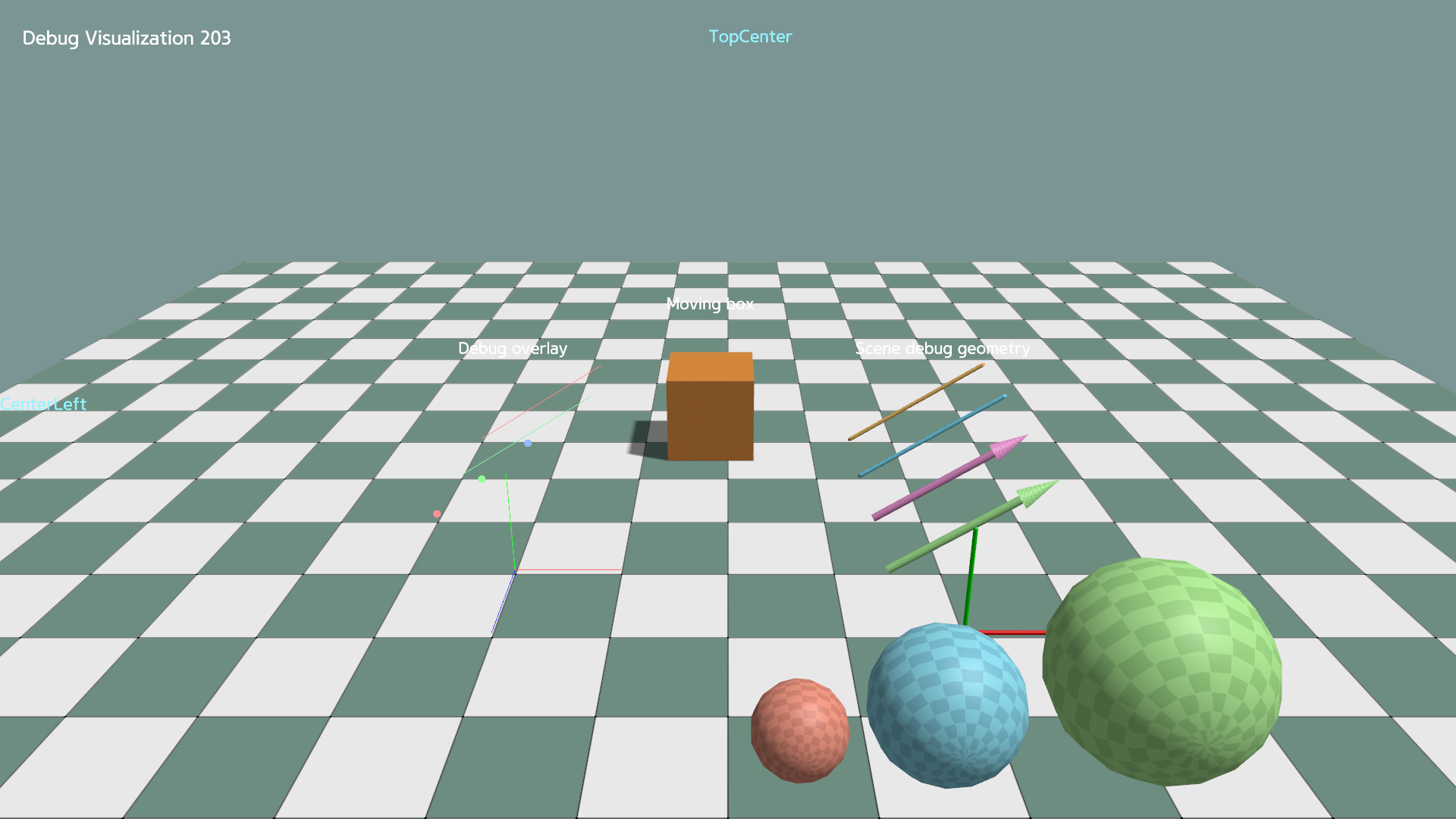
Debug overlay
Use debug_overlay for lightweight lines, points, and axes that do not create
SceneGraph Prims:
self.debug_overlay.axes(
    path="/overlay/axes",
    origin=np.array([0.0, 0.0, 0.0]),
    rotation=np.eye(3),
    length=1.0,
)
Calling the same function with the same path replaces its data. Remove overlay data by path:
self.debug_overlay.clear_lines("/overlay/lines")
self.debug_overlay.clear_points("/overlay/points")
self.debug_overlay.clear("/overlay/axes")
Scene debug geometry
scene.debug_geometry creates mesh-based, instanced SceneGraph renderables.
Keep the returned view to update or remove them:
self.debug_spheres = self.scene.debug_geometry.add_spheres(
    path="/debug_geometry/spheres",
    centers=centers,
    radii=radii,
    colors=colors,
)

self.debug_spheres.update_spheres(
    centers=new_centers,
    radii=radii,
    colors=colors,
)
self.debug_spheres.remove()
Lines and arrows provide matching update_lines() and update_arrows()
methods.
World-space text
Create the entry once, then update only the values that change:
self.world_text.set(
    path="/labels/box",
    text="Box",
    position=ke.Vec3(0.0, 1.2, 0.0),
    pixel_size=28.0,
)

self.world_text.set_position("/labels/box", new_position)
self.world_text.set_text("/labels/box", "Moving box")
self.world_text.remove("/labels/box")
Set depth_test=False when the label should remain visible through scene
geometry.
Screen-space text
position is measured in pixels from the selected anchor. Without an explicit
anchor, it uses TopLeft, so (24, 24) places the text 24 pixels right and
down from the top-left corner:
self.screen_text.set(
    path="/status",
    text="Ready",
    position=ke.Vec2(24.0, 24.0),
    anchor=ke.render.ScreenAnchor.TOP_LEFT,
)

self.screen_text.set_text("/status", "Running")
self.screen_text.remove("/status")
When alignment is omitted, it follows the anchor column automatically:
left, center, or right. Pass an explicit alignment to override it.
Run the complete example:
python ./python/examples/debug_visualization.py
Complete source: debug_visualization.py
  1"""Debug geometry, overlay, and text in one scene."""
  2
  3import math
  4
  5import numpy as np
  6
  7import kangengine as ke
  8
  9
 10class DebugVisualizationApp(ke.App):
 11    def setup(self):
 12        self.count = 0
 13        self.orbit_angle = 0.0
 14        materials = self.create_standard_materials()
 15        self.scene.add_ground("/ground", scale=20.0)
 16
 17        self.box = self.scene.add_mesh(
 18            "/box",
 19            ke.geometry.create_cube_data(1.0),
 20            materials.common,
 21            color=ke.Vec4(0.8, 0.3, 0.05, 1.0),
 22        )
 23        self.box.set_local_translation(ke.Vec3(0.0, 0.5, 0.0))
 24
 25        # Lightweight overlay: no SceneGraph prims are created.
 26        self.debug_overlay.lines(
 27            "/overlay/lines",
 28            np.array([[-3.0, 0.05, -1.0], [-3.0, 0.05, 0.0]]),
 29            np.array([[-1.5, 1.0, -1.0], [-1.5, 1.0, 0.0]]),
 30            np.array(
 31                [
 32                    [1.0, 0.25, 0.2, 1.0],
 33                    [0.2, 0.9, 0.35, 1.0],
 34                ]
 35            ),
 36            width=3.0,
 37        )
 38        self.debug_overlay.points(
 39            "/overlay/points",
 40            np.array([[-3.0, 0.1, 1.0], [-2.5, 0.5, 1.0], [-2.0, 0.9, 1.0]]),
 41            np.array(
 42                [
 43                    [1.0, 0.3, 0.3, 1.0],
 44                    [0.3, 1.0, 0.3, 1.0],
 45                    [0.3, 0.5, 1.0, 1.0],
 46                ]
 47            ),
 48            size=10.0,
 49        )
 50        self.debug_overlay.axes(
 51            "/overlay/axes",
 52            origin=np.array([-2.0, 0.05, 2.0]),
 53            rotation=np.eye(3),
 54            length=1.0,
 55            width=3.0,
 56        )
 57        # Mesh-based debug geometry: visible as ordinary SceneGraph objects.
 58        self.scene.debug_geometry.add_lines(
 59            "/debug_geometry/lines",
 60            np.array([[1.5, 0.05, -1.0], [1.5, 0.05, 0.0]]),
 61            np.array([[3.0, 1.0, -1.0], [3.0, 1.0, 0.0]]),
 62            np.array(
 63                [
 64                    [1.0, 0.6, 0.15, 1.0],
 65                    [0.2, 0.75, 1.0, 1.0],
 66                ]
 67            ),
 68            material=materials.debug,
 69            radius=0.025,
 70        )
 71        self.scene.debug_geometry.add_arrows(
 72            "/debug_geometry/arrows",
 73            np.array([[1.5, 0.05, 1.0], [1.5, 0.05, 2.0]]),
 74            np.array([[3.0, 1.0, 1.0], [3.0, 1.0, 2.0]]),
 75            np.array(
 76                [
 77                    [0.95, 0.35, 0.75, 1.0],
 78                    [0.45, 0.95, 0.35, 1.0],
 79                ]
 80            ),
 81            material=materials.debug,
 82            radius=0.04,
 83        )
 84        self.scene.debug_geometry.add_axes(
 85            "/debug_geometry/axes",
 86            origin=np.array([2.0, 0.05, 3.0]),
 87            rotation=np.eye(3),
 88            material=materials.debug,
 89            length=1.0,
 90            radius=0.02,
 91        )
 92        self.debug_sphere_centers = np.array(
 93            [
 94                [0.5, 0.4, 4.5],
 95                [1.5, 0.6, 4.5],
 96                [2.9, 0.8, 4.5],
 97            ],
 98            dtype=np.float32,
 99        )
100        self.debug_sphere_radii = np.array([0.35, 0.55, 0.75])
101        self.debug_sphere_colors = np.array(
102            [
103                [1.0, 0.35, 0.25, 1.0],
104                [0.3, 0.8, 1.0, 1.0],
105                [0.5, 1.0, 0.35, 1.0],
106            ]
107        )
108        self.debug_spheres = self.scene.debug_geometry.add_spheres(
109            "/debug_geometry/spheres",
110            centers=self.debug_sphere_centers,
111            radii=self.debug_sphere_radii,
112            colors=self.debug_sphere_colors,
113            material=materials.debug,
114        )
115
116        self.world_text.set(
117            "/labels/overlay",
118            "Debug overlay",
119            ke.Vec3(-2.3, 1.5, 0.0),
120            pixel_size=24.0,
121            depth_test=False,
122        )
123        self.world_text.set(
124            "/labels/geometry",
125            "Scene debug geometry",
126            ke.Vec3(2.3, 1.5, 0.0),
127            pixel_size=24.0,
128        )
129        self.world_text.set(
130            "/labels/box",
131            "Moving box",
132            ke.Vec3(0.0, 1.7, 0.0),
133            pixel_size=24.0,
134        )
135        self.screen_text.set(
136            "/screen/title",
137            "Debug Visualization {}".format(self.count),
138            ke.Vec2(30.0, 30.0),
139            pixel_size=28.0,
140        )
141        self.screen_text.set(
142            "/screen/anchor",
143            "TopCenter",
144            ke.Vec2(30.0, 30.0),
145            alignment=ke.render.TextAlignment.CENTER,
146            anchor=ke.render.ScreenAnchor.TOP_CENTER,
147            color=ke.Vec4(0.3, 0.9, 1.0, 1.0),
148            pixel_size=25.0,
149        )
150        self.screen_text.set(
151            "/screen/anchor2",
152            "CenterLeft",
153            ke.Vec2(0.0, 0.0),
154            anchor=ke.render.ScreenAnchor.CENTER_LEFT,
155            color=ke.Vec4(0.3, 0.9, 1.0, 1.0),
156            pixel_size=25.0,
157        )
158
159        # self.set_camera_view([7.0, -9.0, 6.0], [0.0, 0.0, 0.8])
160
161    def pre_render(self):
162        self.orbit_angle = (
163            self.orbit_angle + math.radians(120.0) * self.get_delta_time()
164        ) % (2.0 * math.pi)
165        self.box.set_local_translation(
166            ke.Vec3(
167                math.cos(self.orbit_angle),
168                0.5,
169                math.sin(self.orbit_angle),
170            )
171        )
172
173        box_pos = self.box.get_world_translation()
174        box_quat = self.box.get_world_rotation()
175        self.world_text.set_position(
176            "/labels/box",
177            box_pos + box_quat * ke.Vec3(0.0, 1.2, 0.0),
178        )
179
180        sphere_centers = self.debug_sphere_centers.copy()
181        sphere_centers[:, 1] += 0.1 * np.sin(
182            self.orbit_angle + np.arange(len(sphere_centers))
183        )
184        self.debug_spheres.update_spheres(
185            sphere_centers,
186            self.debug_sphere_radii,
187            self.debug_sphere_colors,
188        )
189
190        self.screen_text.set_text(
191            "/screen/title",
192            "Debug Visualization {}".format(self.count),
193        )
194        self.count += 1
195
196
197if __name__ == "__main__":
198    app = DebugVisualizationApp()
199    app.initialize(1920, 1080, False, ke.UpAxis.Y)
200    app.start()