First Scene
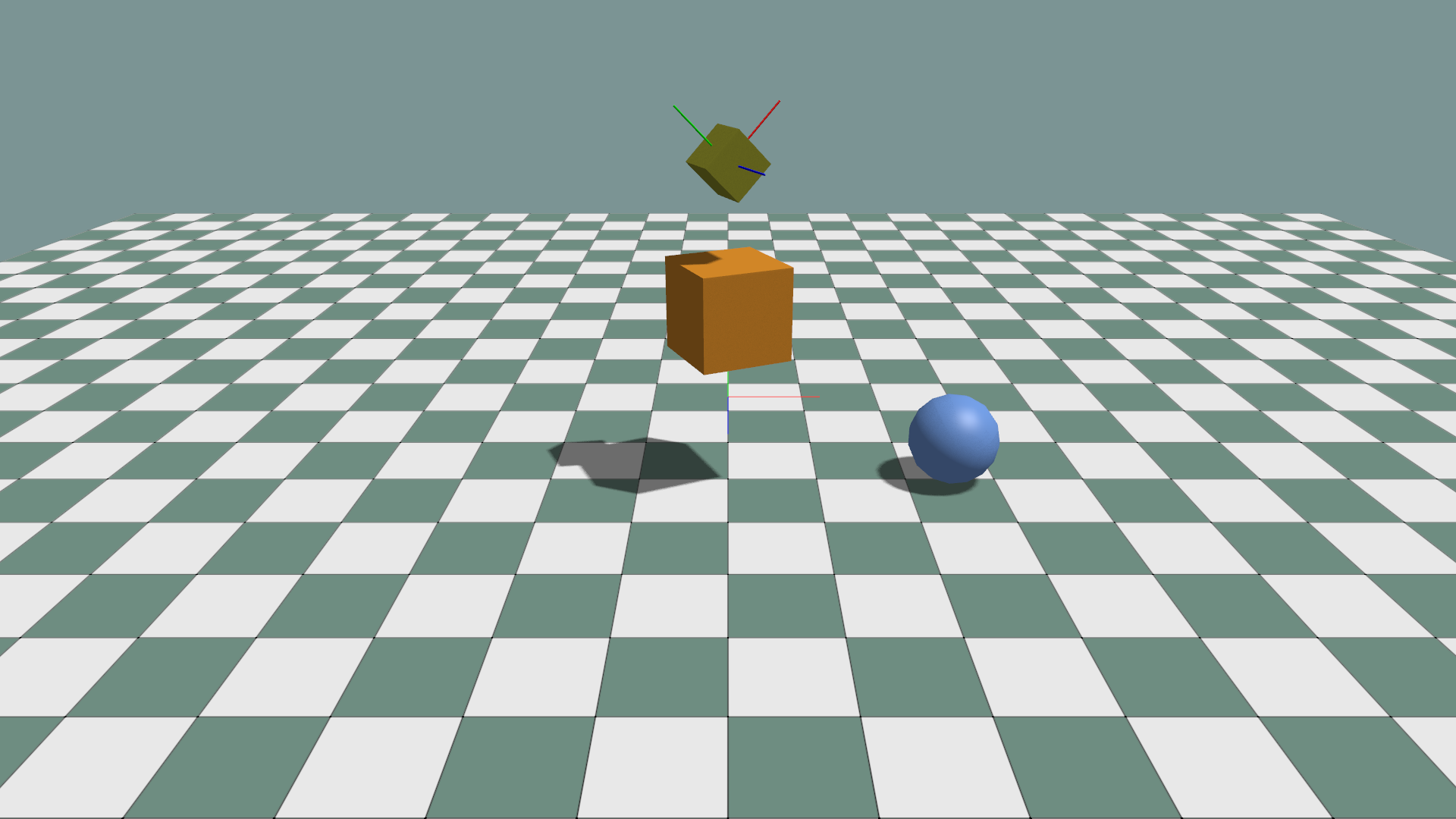
This example creates geometry data, inserts it into the scene, and demonstrates materials, hierarchy, local/world transforms, quaternion input, and debug axes.
import numpy as np


class MyApp(ke.App):
    def setup(self):
        self.standard_materials = self.create_standard_materials()
        self.scene.add_ground(path="/ground", scale=30.0)

        box: ke.RenderablePrimView = self.scene.add_mesh(
            path="/box",
            mesh_data=ke.geometry.create_cube_data(scale=1.0),
            material=self.standard_materials.common,
            color=ke.Vec4(0.8, 0.3, 0.02, 1.0),
        )
        box.set_local_translation(translation=ke.Vec3(0.0, 2.0, 0.0))
        box.set_local_rotation_axis_angle(
            axis=ke.Vec3(0.0, 1.0, 0.0),
            angle_radians=np.deg2rad(25.0),
        )
The important separation is:
ke.geometry.create_cube_data(...)creates mesh data only.app.scene.add_mesh(...)creates a scene prim and renderable view.The returned
boxview controls common rendering and transform operations.box.primremains available for lower-level scene graph operations.
Parent and child transforms
An absolute prim path establishes hierarchy. /box/box2 is a child of
/box, so its local transform is relative to the first box.
box2: ke.RenderablePrimView = self.scene.add_mesh(
    path="/box/box2",
    mesh_data=ke.geometry.create_cube_data(scale=1.0),
    material=self.standard_materials.common,
)
box2.set_local_translation(translation=ke.Vec3(0.0, 1.5, 0.0))
box2.set_local_scale(scale=ke.Vec3(0.5, 0.5, 0.5))

local_position = box2.get_local_translation()
world_position = box2.get_world_translation()
Use set_world_translation(...) when a value is already expressed in scene
coordinates. Otherwise, prefer local transforms so children follow their
parent naturally.
Quaternion ordering
ke.Quat and NumPy inputs to quaternion object APIs use wxyz ordering.
# Approximately 45 degrees around Z, in wxyz order.
box2.set_local_rotation(
    np.array([0.924, 0.0, 0.0, 0.383], dtype=np.float32)
)

rotation = box2.get_world_rotation()
rotation_wxyz = rotation.to_wxyz()
rotation_xyzw = rotation.to_xyzw()
Physics and simulation state arrays named rot_xyzw retain xyzw ordering.
Use ke.Quat.from_xyzw(...) when moving such a value into a scene quaternion
API.
Inspect transform axes
For a lightweight render overlay that does not create a scene prim:
self.debug_overlay.axes(
    "/debug/world_axes",
    origin=np.array([0.0, 1.0, 0.0]),
    rotation=np.eye(3),
    length=1.0,
)
To create axes that appear in the SceneGraph, use the scene-backed helper:
self.scene.debug_geometry.add_axes(
    "/debug/box2_axes",
    box2.get_world_translation(),
    box2.get_world_rotation(),
    length=0.8,
    radius=0.01,
)
debug_overlay draws directly through the graphics debug renderer and does not
create scene prims. scene.debug_geometry creates mesh-based renderables that
appear in the SceneGraph and returns a DebugPrimitiveView.
Run the complete example:
python ./python/examples/render_prim_scene.py
Complete source: render_prim_scene.py
 1"""
 2Render Prim Scene — Python equivalent of test_prim_scene.cpp.
 3Demonstrates the material-first Prim scene graph.
 4"""
 5
 6import numpy as np
 7
 8import kangengine as ke
 9
10
11class MyApp(ke.App):
12    def setup(self):
13        self.standard_materials = self.create_standard_materials()
14
15        self.debug_overlay.axes(
16            "/debug/box_axes",  # is not shown in the scene graph.
17            origin=np.array([0.0, 1.0, 0.0]),
18            rotation=np.eye(3),
19            length=1.0,
20            width=5.0,
21        )
22
23        # Ground plane (Y-up)
24        self.scene.add_ground("/ground", scale=30.0)
25
26        # Box
27        box = self.scene.add_mesh(
28            "/box",
29            ke.geometry.create_cube_data(1.0),
30            self.standard_materials.common,
31            color=ke.Vec4(0.8, 0.3, 0.02, 1.0),
32        )
33        box.set_local_translation(ke.Vec3(0.0, 2.0, 0.0))
34        box.set_local_rotation_axis_angle(ke.Vec3(0.0, 1.0, 0.0), np.deg2rad(25.0))
35
36        # Box2
37        box2 = self.scene.add_mesh(
38            "/box/box2",
39            ke.geometry.create_cube_data(1.0),
40            self.standard_materials.common,
41            color=ke.Vec4(0.3, 0.3, 0.02, 1.0),
42        )
43        box2.set_local_translation(ke.Vec3(0.0, 1.5, 0.0))
44        box2.set_local_rotation(np.array([0.924, 0, 0, 0.383]))
45        box2.set_local_scale(ke.Vec3(0.5, 0.5, 0.5))
46
47        w_trans = box2.get_world_translation()
48        w_ori = box2.get_world_rotation()
49        self.scene.debug_geometry.add_axes(
50            "/debug/box2_axes",
51            w_trans,
52            w_ori,
53            length=0.8,
54            radius=0.01,
55            segments=8,
56        )
57        # self.scene.remove_prim("/debug/box2_axes")
58
59        print(box2.get_local_translation())
60        print(box2.get_local_rotation())
61        print(box2.get_local_rotation().to_wxyz())
62        print(box2.get_local_rotation().to_xyzw())
63        print(box2.get_world_translation())
64        print(np.array(w_ori))
65        # box2.remove()
66
67        # Sphere
68        sphere = self.scene.add_mesh(
69            "/sphere",
70            ke.geometry.create_sphere_data(0.5, 16, 12),
71            self.standard_materials.common,
72            color=ke.Vec4(0.2, 0.4, 0.9, 1.0),
73        )
74        sphere.set_local_translation(ke.Vec3(2.5, 0.5, 0.0))
75
76        self.check_error()
77
78    def pre_render(self):
79        self.check_error()
80
81    def render(self):
82        pass
83
84    def post_render(self):
85        pass
86
87
88if __name__ == "__main__":
89    app = MyApp()
90    app.initialize(1920, 1080, False, ke.UpAxis.Y)
91    app.start()
Next: First Simulation or Scene and Rendering.