Newton Viewer
KangEngine can be used as a viewer for Newton simulations. Newton
owns the simulation while ViewerKE handles rendering and interaction.
Install
uv pip install newton
Basic example
import newton

from kangengine.adapters.newton import ViewerKE

builder = newton.ModelBuilder()
body = builder.add_body()
builder.add_shape_box(body, hx=0.5, hy=0.5, hz=0.5)

model = builder.finalize(device="cpu")  # or "cuda:0"
state = model.state()

viewer = ViewerKE()
viewer.set_model(model)
try:
    while viewer.is_running():
        # Step Newton and update state here.
        viewer.begin_frame(0.0)
        viewer.log_state(state)
        viewer.end_frame()
finally:
    viewer.close()
Run the complete rigid-body example:
python ./python/examples/adapters/newton/newton_basic_shapes.py
Complete source: newton_basic_shapes.py
  1"""Run a Newton rigid-body simulation with KangEngine as its viewer.
  2
  3Newton owns the model, contacts, solver, and state. KangEngine receives the
  4Newton ViewerBase calls and only handles rendering, input, and the window.
  5Use Shift + Left drag to apply a Newton-owned picking force.
  6"""
  7
  8from __future__ import annotations
  9
 10import argparse
 11
 12import numpy as np
 13
 14from kangengine.adapters.newton import ViewerKE
 15
 16
 17def main():
 18    parser = argparse.ArgumentParser()
 19    parser.add_argument("--width", type=int, default=1920)
 20    parser.add_argument("--height", type=int, default=1080)
 21    parser.add_argument("--headless", action="store_true")
 22    parser.add_argument(
 23        "--frames",
 24        type=int,
 25        default=0,
 26        help="Stop after this many rendered frames; zero runs until closed.",
 27    )
 28    args = parser.parse_args()
 29
 30    import newton
 31    import warp as wp
 32
 33    newton.use_coord_layout_targets = True
 34    builder = newton.ModelBuilder()
 35    builder.add_ground_plane()
 36
 37    sphere = builder.add_body(
 38        xform=wp.transform(p=wp.vec3(-2.0, -2.0, 2.0), q=wp.quat_identity()),
 39        label="sphere",
 40    )
 41    builder.add_shape_sphere(sphere, radius=0.5)
 42
 43    capsule = builder.add_body(
 44        xform=wp.transform(p=wp.vec3(0.0, -2.0, 2.0), q=wp.quat_identity()),
 45        label="capsule",
 46    )
 47    builder.add_shape_capsule(capsule, radius=0.3, half_height=0.7)
 48
 49    box = builder.add_body(
 50        xform=wp.transform(p=wp.vec3(2.0, -2.0, 2.0), q=wp.quat_identity()),
 51        label="box",
 52    )
 53    builder.add_shape_box(box, hx=0.5, hy=0.35, hz=0.25)
 54
 55    cylinder = builder.add_body(
 56        xform=wp.transform(p=wp.vec3(-2.0, 0.0, 2.0), q=wp.quat_identity()),
 57        label="cylinder",
 58    )
 59    builder.add_shape_cylinder(cylinder, radius=0.35, half_height=0.65)
 60
 61    cone = builder.add_body(
 62        xform=wp.transform(p=wp.vec3(0.0, 0.0, 2.0), q=wp.quat_identity()),
 63        label="cone",
 64    )
 65    builder.add_shape_cone(cone, radius=0.5, half_height=0.65)
 66
 67    tetra_mesh = newton.Mesh(
 68        vertices=np.array(
 69            [
 70                [-0.6, -0.5, -0.4],
 71                [0.6, -0.5, -0.4],
 72                [0.0, 0.6, -0.4],
 73                [0.0, 0.0, 0.7],
 74            ],
 75            dtype=np.float32,
 76        ),
 77        indices=np.array([0, 2, 1, 0, 1, 3, 1, 2, 3, 2, 0, 3], dtype=np.int32),
 78    )
 79    mesh_body = builder.add_body(
 80        xform=wp.transform(p=wp.vec3(2.0, 0.0, 2.0), q=wp.quat_identity()),
 81        label="mesh",
 82    )
 83    builder.add_shape_mesh(mesh_body, mesh=tetra_mesh)
 84
 85    model = builder.finalize()
 86    state_0 = model.state()
 87    state_1 = model.state()
 88    control = model.control()
 89    collision_pipeline = newton.CollisionPipeline(model)
 90    contacts = collision_pipeline.contacts()
 91    solver = newton.solvers.SolverXPBD(model, iterations=10)
 92
 93    viewer = ViewerKE(
 94        width=args.width,
 95        height=args.height,
 96        headless=args.headless,
 97    )
 98    viewer.show_ground = False
 99    viewer.app.scene.add_ground("/Ground", scale=20.0)
100    viewer.set_model(model)
101    viewer.set_camera(wp.vec3(8.0, -8.0, 4.0), pitch=-10.0, yaw=135.0)
102
103    frame_dt = 1.0 / 60.0
104    substeps = 4
105    sim_dt = frame_dt / substeps
106    sim_time = 0.0
107    rendered_frames = 0
108
109    try:
110        while viewer.is_running():
111            if viewer.should_step():
112                for _ in range(substeps):
113                    state_0.clear_forces()
114                    viewer.apply_forces(state_0)
115                    collision_pipeline.collide(state_0, contacts)
116                    solver.step(
117                        state_0,
118                        state_1,
119                        control,
120                        contacts,
121                        sim_dt,
122                    )
123                    state_0, state_1 = state_1, state_0
124                sim_time += frame_dt
125
126            viewer.begin_frame(sim_time)
127            viewer.log_state(state_0)
128            viewer.log_contacts(contacts, state_0)
129            viewer.end_frame()
130            rendered_frames += 1
131            if args.frames > 0 and rendered_frames >= args.frames:
132                break
133    finally:
134        viewer.close()
135
136
137if __name__ == "__main__":
138    main()
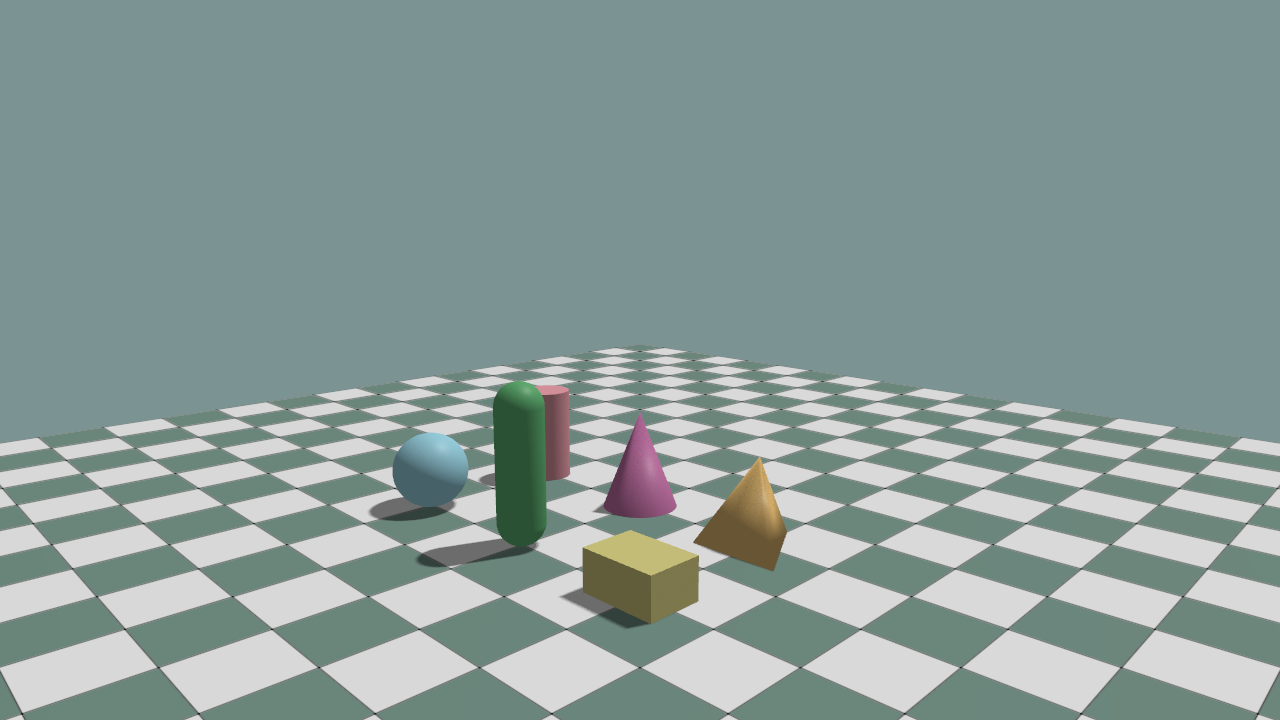
The example simulates sphere, capsule, box, cylinder, cone, and mesh shapes in
Newton and displays them through ViewerKE. Shift + left drag applies a picking force.